
Inside My Rogue IP
Published: June 17, 2025
Ever wondered how sneaky cyber threats try to slip through the cracks? Well, I did too—and that curiosity led me to build my very own rogue IP detector. It's my digital watchdog, sniffing out suspicious activity and keeping things secure.
In this blog, I’ll share how it works, the little challenges along the way, and some cool insights from the journey. Whether you're a tech enthusiast or just curious about keeping your online space safe, you’re in for an interesting ride!
🚨 The Problem: Unknown Connections
Ever run netstat and see dozens of foreign IP addresses connected to your system — and wonder, "Who are you, and why are you talking to my laptop?"
Most users:
- Don’t know what those IPs are
- Can’t tell if they’re safe
- Don’t have time to Google each one
That’s where this project began.
🧰 The Solution: A Browser-Based IP Inspector
I created a pure HTML + JS web app that:
- Parses a
.txtfile fromnetstat -ano > netstat.txt - Cross-references the IPs against Microsoft’s official IP ranges
- Highlights rogue IPs in red, and safe ones in green
- (Bonus): Fetches Geo-IP info using
ipinfo.iofor each suspicious IP
🛠️ How It Works
1. User Uploads netstat.txt
The browser reads the file using the FileReader API — no backend needed.
2. IP Extraction
It uses regex to parse each line and grab the foreign IP (not the local one), like:

3. Safe IP Comparison
It fetches Microsoft’s list of legit IPs, either:
- Live from their endpoint API (using a proxy to avoid CORS)
- Or from a local
legit_ips.jsonfile
It flattens all CIDRs to raw IPs and compares:
4. Highlight and Explain
Each IP is shown in a responsive table:
- ✅ Green for Microsoft IPs
- 🚨 Red for unknowns
- With optional
ipinfo.iolookups showing ISP, country, and org
💡 Why This Project Matters
- Quick visibility into who’s connected
- A beginner-friendly take on network monitoring
- Fully local — no files uploaded, no data shared
- 100% browser-based, GitHub Pages–friendly
📎 What I Learned
- Efficient IP parsing with JavaScript
- Responsive UI design for real data display
- CORS, proxies, and the limits of client-side APIs
- Real-world use of
netstatfor cybersecurity
✅ Try It Yourself
Run this in CMD or PowerShell:
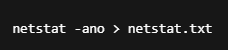
Then upload the file to the tool — and find out who your system is quietly talking to 👀
🧠 Final Thoughts
This app started as a simple netstat parser, but it became something far more useful: a quick and easy tool to stay informed about your device's digital behavior.
Whether you're a developer, student, or just curious — knowing your connections is power.